How to set a password for the Battery Lock Box?Updated 27 minutes ago
DISCLAIMER
The Battery Lock Box is for temporary storage of personal items only. This lock box does not guarantee protection against theft, unauthorized access, loss, or damage. Do not store valuables or irreplaceable items. The user assumes full responsibility for stored contents. The manufacturer and seller are not liable for any loss, theft, damage, or misuse.
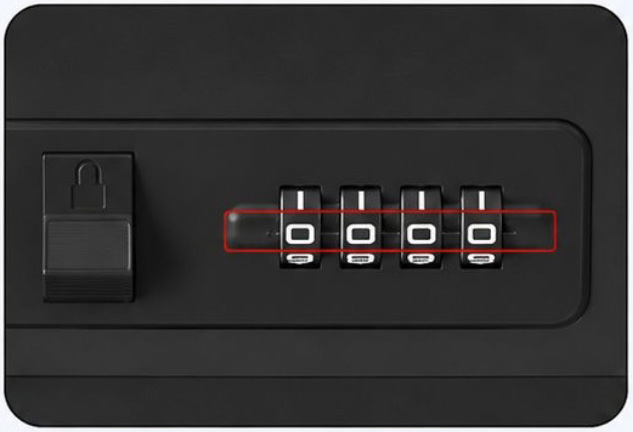
1. Set the lock to the default code (0000).
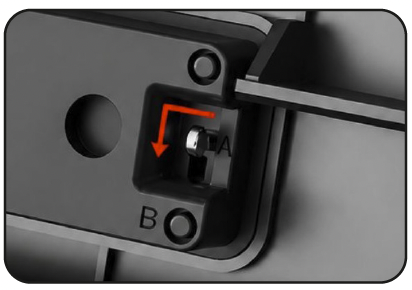 2. Open the case move the code lever from "A" to "B".
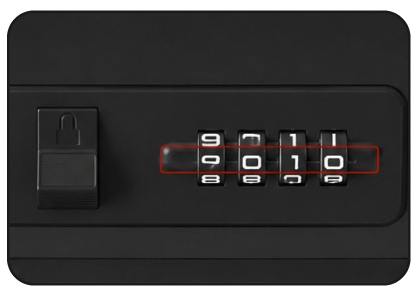
3. Choose your new 4-digit combination (for example, 9010).
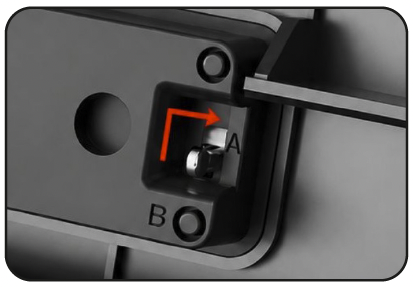
4. Save the new password by moving the code lever back from “B” to “A”. Your new password is now set.